Most VPS servers ship with security gaps from day one. One command tells you exactly which ones, and how to fix them.
Have the command? Paste it into your server terminal:
You set up your server once, deploy your app, and move on. These four issues are sitting on hundreds of thousands of servers right now.
Most VPS are deployed with SSH admin access enabled. It is the default configuration from nearly every provider. Any attacker who gets your password gains full control. No need to exploit any vulnerability. A weak root password can be brute-forced in minutes.
Compromised credentials have been the number one attack vector for 10 consecutive years, according to the most cited breach report in the industry.
Trend Micro scanned the internet with Shodan and found over 8,000 Redis instances without a password or encryption, some on AWS, Azure, and Google Cloud. Any attacker can connect, read, or delete all data in seconds. No credentials needed. No warning from your hosting provider.
Redis was designed for trusted environments, not to be exposed to the internet. Its official documentation warns about this. Yet thousands of servers do it, with user sessions, cache, and temporary data from all their clients accessible to anyone.
Docker modifies network rules directly, bypassing UFW. You can have port 5432 blocked in your firewall while your database is fully accessible because Docker opened it on the host. Palo Alto Unit 42 documented exposed Docker servers identifiable on Shodan in seconds.
This behavior is documented by Docker's own creators. Your database might be open to the internet even though you are sure you closed that port.
Database passwords, API keys, Stripe secrets. GitGuardian analyzed 1.4 billion commits in 2024 and found nearly 24 million exposed credentials, a 25% increase from the previous year. Pushed to a private repo, the repo goes public later, and the keys stay in Git history forever.
70% of secrets leaked in 2022 were still active in 2024. If the repo was public even for a minute, those credentials are already in search indexes, and they still work.
We audit your server's security, not your code. If you manage a Linux VPS with services exposed to the internet, this is for you.
The audit adapts to your stack. If you use Docker, we check your containers. If you have Redis, we verify its configuration. If you don't have them, we focus on the other attack surfaces.
No agent to keep running. No persistent access to your server. Nothing to configure.
We email you the command to run on your server. No password, no account setup, no credit card.
SSH into your server and paste the command we sent. It runs locally, collects findings, and exits cleanly. Nothing is installed permanently.
A detailed report lands in your inbox. Every finding includes the specific command to fix it, not a generic recommendation.
Every finding is specific to your server. Not a generic checklist. The report covers all 25 checks plus an external port scan, with exact fix commands for each finding.

The free audit covers the 6 most critical issues. The paid audit runs all 25 checks plus an external scan from our servers against your public IP.
| Check | Tier | Severity |
|---|---|---|
SSH root login enabled Direct root access enabled. Any attacker who guesses the password gains full control of the server. | Free | Critical |
SSH on default port Port 22 is the first one automated bots scan. Changing it reduces attack noise. | Free | Warning |
Password login enabled Passwords can be brute-forced. SSH key-only login prevents this entirely | Paid | Warning |
Unknown SSH keys Unexpected keys in authorized_keys could mean someone has access you didn't authorize | Paid | Info |
Credentials exposed in Git Database passwords and API keys committed to a repository, visible to anyone with repo access | Free | Critical |
Pending security patches Known vulnerabilities with public exploits that haven't been patched yet | Free | Critical |
Config file permissions Checks if configuration files with credentials are readable by other server users | Paid | Warning |
Credentials in process list Passwords visible in the running process list. Any server user can read them. | Paid | Critical |
.git directory exposed via HTTP .git directory is publicly accessible. Anyone can download the source code and repository credentials. | Paid | Critical |
Firewall configured Checks which ports are open to the internet and if the firewall is active | Free | Critical |
IPv6 without firewall rules IPv6 enabled but no firewall rules. Ports blocked by IPv4 may be accessible via IPv6. | Paid | Critical |
Automatic attack blocking Checks if repeated failed login attempts are automatically blocked | Free | Critical |
Admin user accounts Checks how many accounts have full admin access. More than needed increases risk. | Paid | Warning |
System disk usage Disk occupancy level. A full disk can cause service outages and log loss. | Paid | Info |
SSL certificate expiry When a certificate expires, your site shows a security warning and users can't connect | Paid | Warning |
Apps running as admin Containers running as root. If the app is compromised, the attacker gains full server access. | Paid | Warning |
Docker bypasses firewall Docker can open ports to the internet that your firewall never sees | Paid | Critical |
Unprotected Docker API An unprotected Docker API gives anyone on the network full control over all your containers | Paid | Critical |
Docker socket mounted in container docker.sock mounted inside a container. If that container is compromised, the attacker controls all of Docker. | Paid | Critical |
Database open to internet Your PostgreSQL database is accessible from the internet. No credentials needed to connect. | Paid | Critical |
Cache database unprotected Redis without a password. Any process on your network can read or flush your session data | Paid | Critical |
MongoDB open to internet MongoDB accessible without authentication from the internet | Paid | Critical |
Login attack history How many failed login attempts in the last 24 hours and from which IPs | Paid | Info |
Top attacker IPs The addresses most actively trying to access your server, with reputation data | Paid | Info |
Active attack detected Unusually high number of login failures in the last hour, possible brute-force attack in progress | Paid | Warning |
What attackers see from outside Scan from our servers against your public IP. Shows what's truly accessible from the internet, regardless of your local firewall | Paid | Critical if open |
No recurring charges. Pay once per server, get your report, fix your server.
The 6 checks that matter most. No credit card, no catch. Up to 3 servers free.
Every check, every attack surface. Full report with exact fix commands for each finding.
Start with the free audit. If it finds issues, the full report is $9. One payment, no subscription.
No. The script downloads a temporary file, runs the checks, sends the results to our API, and then deletes itself. After the audit completes, nothing remains on your server.
You need Node.js available on your server. If it is not installed, the script will tell you and exit without doing anything.
No. Server Audit checks your server's security configuration: SSH, firewall, Docker, databases, SSL certificates, file permissions, and exposed ports. It does not review your application source code.
The language or framework you use (PHP, Python, Node.js, Go, Rust) does not matter. We audit the server your app runs on, not the app itself. If you need source code analysis, you need a SAST or DAST tool.
No. The audit runs entirely on your machine. You paste one command into your own terminal. We never receive SSH credentials, private keys, or any form of remote access.
The script sends only the check results (whether specific settings are enabled or disabled, which ports are open) to our API. It does not transmit file contents, passwords, or application data.
Only the output of each security check: whether admin SSH login is enabled, which ports are open, whether automatic attack blocking is running, and similar yes/no or numeric values.
It does not send file contents, database contents, application code, or the values of any environment variables.
Ubuntu 20.04, 22.04, and 24.04. Debian 11 and 12. The script detects your OS at startup and adapts its checks accordingly. Requires systemd.
Running on a different distribution? Generic checks will still run. Anything distro-specific will be skipped with a note in the report.
The free audit runs 6 checks focused on the most common and highest-impact issues: admin SSH login, firewall state, automatic attack blocking, credentials in Git, pending updates, and SSH port. It shows a qualitative status without a numeric score.
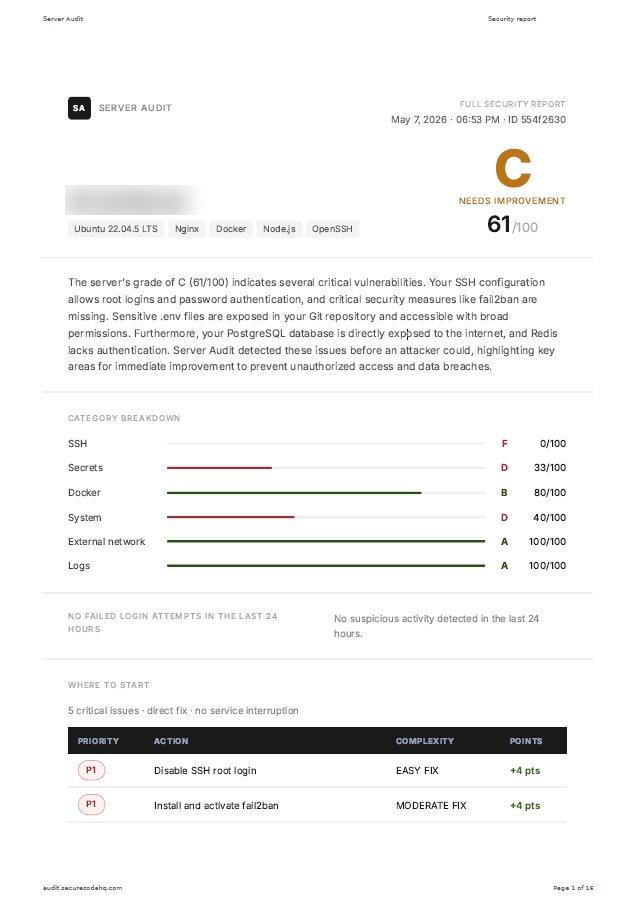
The paid audit runs all 25 checks across SSH, filesystem, firewall, Docker, databases, system, and logs, plus an external port scan from our servers. It gives you a grade (A–F) with a numeric score (0–100), a full explanation of each finding, and exact terminal commands to fix each issue.
Each token is bound to a server (IP) on first use. One token = one server. Free tokens are single-use and expire after 30 days. You can create up to 3 free tokens.
Each paid credit ($9) lets you create a new token with access to all 25 checks and 90 days of validity.
Yes. Each server needs its own token. With the free plan you can create up to 3 tokens (3 servers). For more servers or full audits, each one costs $9.
Each token is bound to the server's IP on first use and cannot be reused on another server.
The report contains security findings specific to your server, including which vulnerabilities are present. Treat it like any security document: share it with people who need to act on it, do not post it publicly.
We do not publish reports. Each report is only accessible to the email address that requested the audit.
No. You just need to be able to SSH into your server. We explain how in the email we send you. Paste one command, wait 2 minutes, and get a report in your inbox with every issue explained in plain language and the exact command to fix it.
If anything in the report is unclear, you can open a support ticket directly from your dashboard.
No. The audit only reads information from your server. It does not change configuration, restart services, or install anything. Think of it like a blood test for your server: it checks the state but does not touch anything.
The script deletes itself automatically when done. Your server stays exactly as it was.
Start with 6 essential checks at no cost. Upgrade to the full 25-check report if you find issues worth digging into.
No credit card. Nothing installed. Free for up to 3 servers.